
Why HVAC Websites Lose Calls - and How to Spot the Bottleneck
· Updated November 9, 2026

Founder, Honest HVAC Marketing Agency
Digital marketer since 2013. Runs every account himself.
Copies the link to this page
Introduction
Honest HVAC Marketing Agency's guide to why HVAC websites lose calls starts with one point: more website traffic won't necessarily mean more HVAC calls. Your website can lose ready-to-book homeowners when they can't quickly confirm you handle their repair, serve their area, and offer a clear way to contact you. A buried phone number or a broken mobile call button can turn a marketing visit into a missed job.
But a low call count doesn't prove the website is the bottleneck. Check the full path, from relevant visits and working contact options to answered calls and booked appointments. For example, calls that go unanswered point to a lead-handling gap, while visitors who can't find your number may be encountering website friction. Tracking these stages helps you identify what to fix before spending on a redesign.
HVAC Website Key Takeaways
More traffic won't reliably produce calls if visitors can't find services, coverage, or contact options.
Make phone numbers and click-to-call buttons easy to find and use on mobile.
Use clear service pages, current business details, genuine reviews, and relevant credentials to build trust.
Test the complete mobile path, including service pages, calls, forms, and booking options.
Separate website friction from missed calls, slow follow-up, and poor lead fit.
Track visits, inquiries, answered calls, appointments, and completed jobs by marketing source.
Confirm the website provider's scope, costs, reporting, and asset ownership before hiring.
How Does Website Friction Cost You HVAC Service Calls?
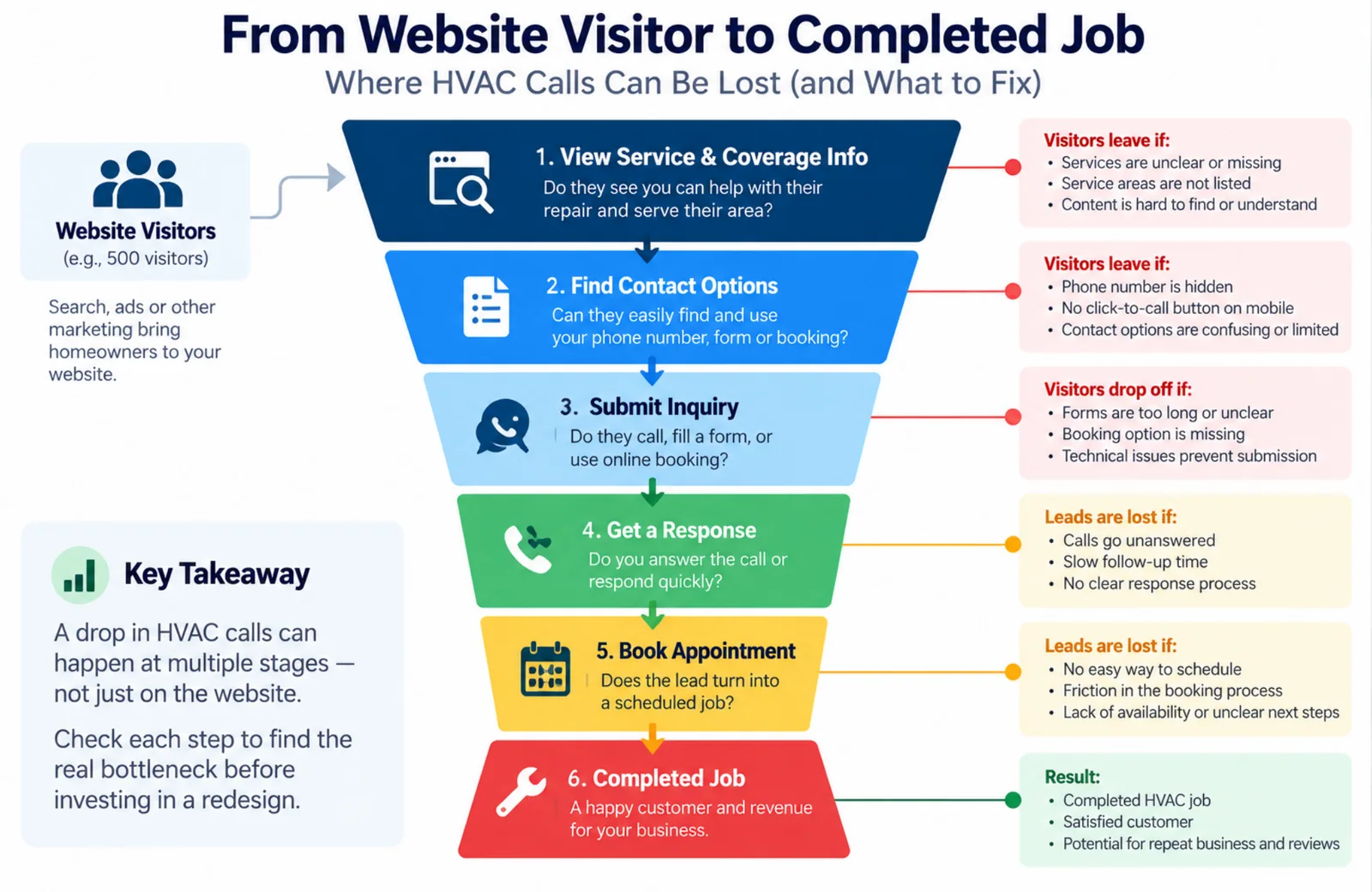
Website friction can cost you HVAC service calls when ready-to-book homeowners can’t quickly confirm that you can help. Search and advertising may bring qualified visitors to your site, but more traffic won’t reliably produce more calls if people can’t find a clear next step.
Your website should make it easy to confirm that you handle a specific repair, installation, or maintenance job, serve the visitor’s area, and can help when needed. If service or coverage details are buried or missing, homeowners may assume you’re not a fit and call a competitor instead. Clear availability information also sets expectations before someone spends time contacting you.
Make the path to contact just as clear, especially on mobile. Keep your phone number easy to find and tap, include other contact options you actually use, and explain when homeowners can expect a response. A hidden number or vague form can stop an inquiry before it starts. That’s different from a missed call or slow follow-up, which happens after someone tries to reach you. If your team doesn’t answer, a website redesign won’t fix that booking gap.
Trust matters because homeowners are choosing someone to enter their home. Effective HVAC trust signals include genuine customer reviews, applicable licenses and insurance, and credentials such as North American Technician Excellence (NATE) certifications or Environmental Protection Agency (EPA) credentials. Real photos of your technicians, team, and branded trucks help homeowners picture who may arrive at their door. Stock photos alone offer less reassurance. Avoid using “EPA licenses” as a catchall; identify the specific, applicable credentials your business holds.
A local HVAC website should make services, coverage, contact details, and proof of trust easy to find. Before blaming the site, check whether your team answers calls and whether your marketing brings in the kinds of jobs you want. A channel that attracts inquiries for work you don’t offer is a poor fit, even if the website converts well.
The business impact is easier to see with hypothetical math. With 500 visitors, a 2% contact rate produces 10 leads, while a 6% rate produces 30. If 70% of leads book and the average job is $350, the outcomes would be:
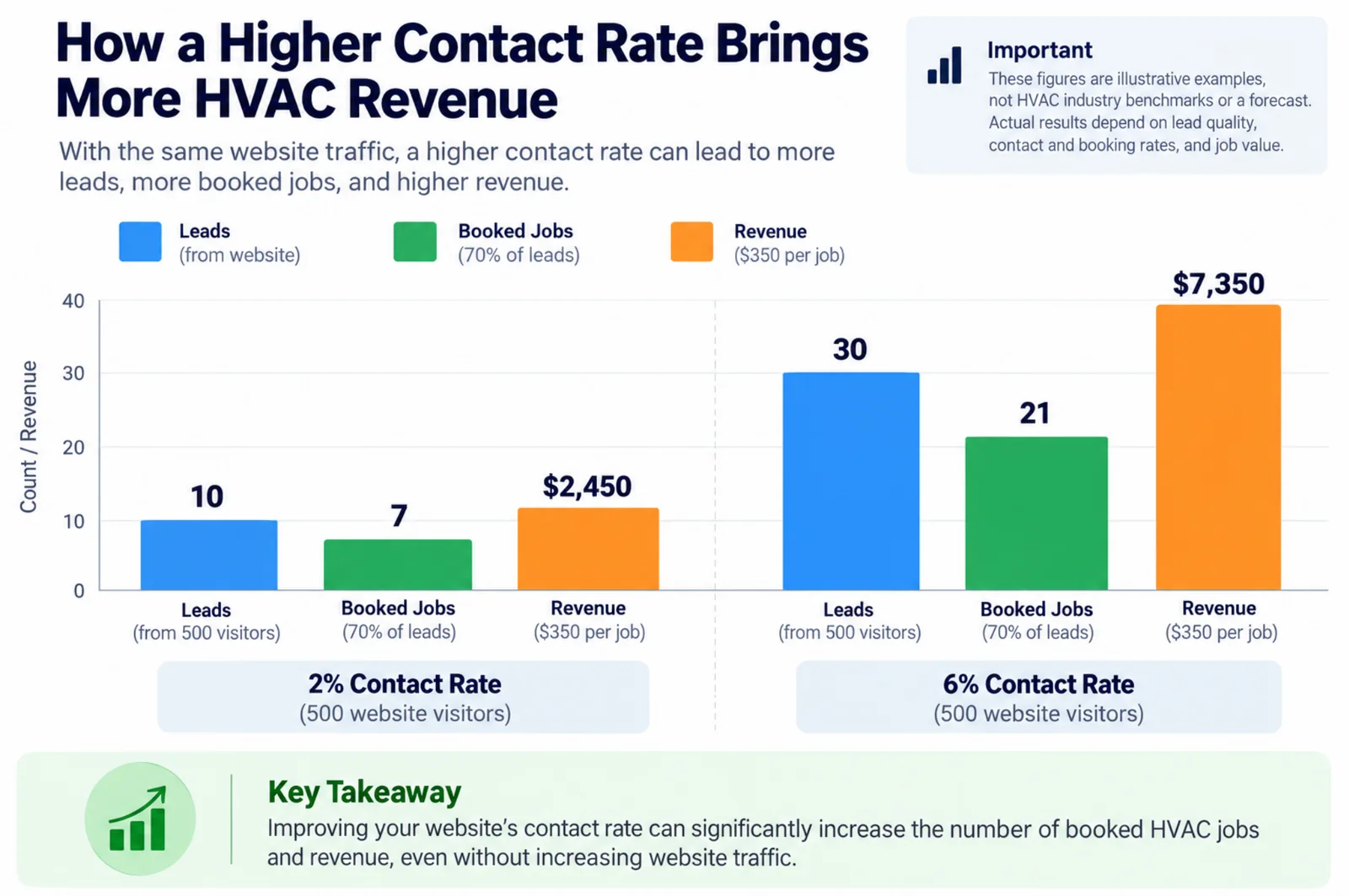
| Contact rate | Leads | Booked jobs at 70% | Job revenue at $350 per job |
|---|---|---|---|
| 2% | 10 | 7 | $2,450 |
| 6% | 30 | 21 | $7,350 |
The example shows how improving the contact rate could change outcomes without increasing visitor volume, though these figures are illustrative, not an HVAC benchmark or a redesign forecast. Actual results depend on lead quality, contact and booking rates, and job value. Judge website friction by its effect on qualified inquiries and booked jobs, not traffic alone.
Which Website Problems Make Homeowners Leave?
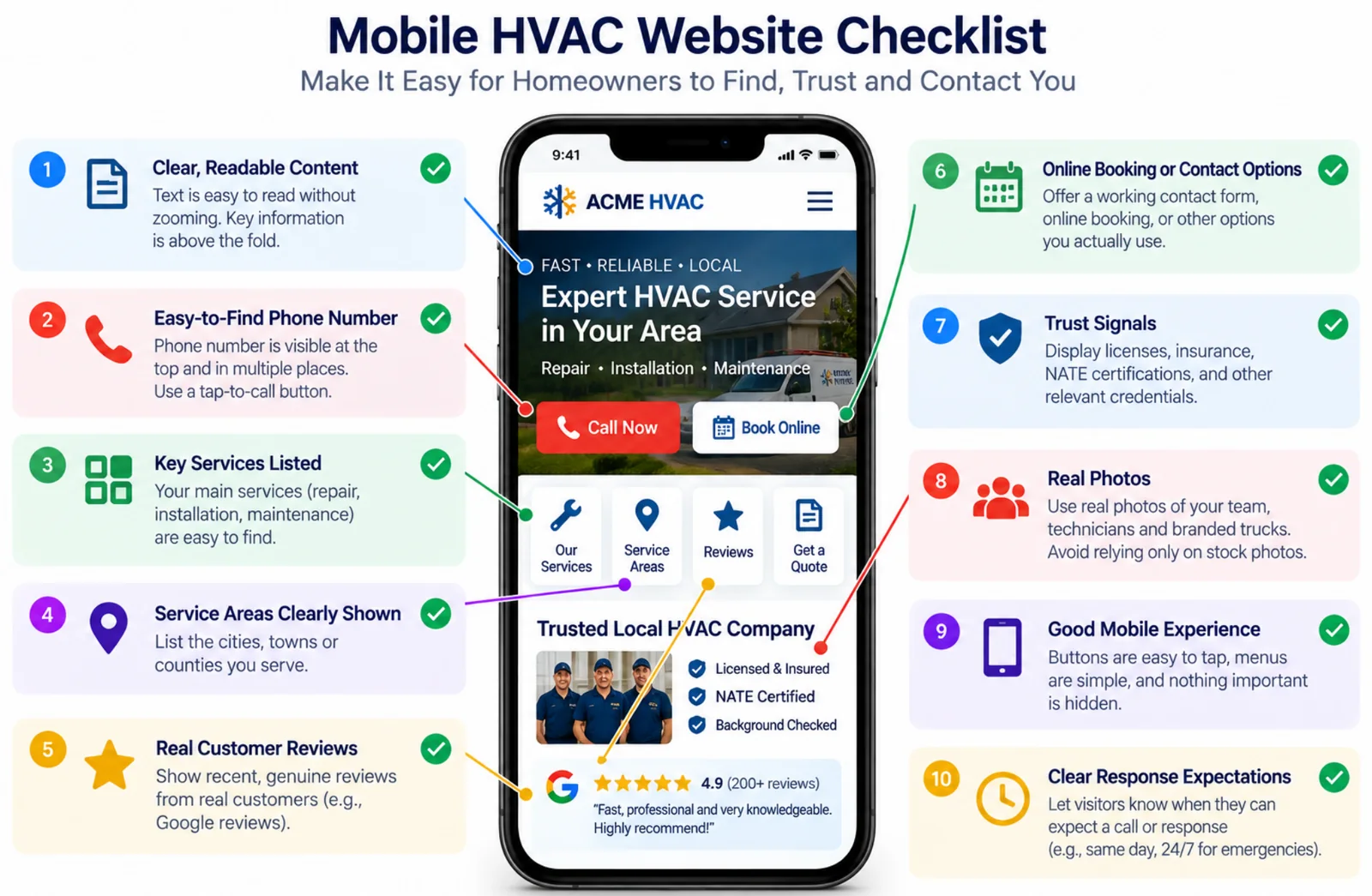
Beyond the contact-rate math, homeowners leave an HVAC website when it’s hard to find the right service, trust the company, or make contact. A polished desktop design won’t help if someone with a broken furnace can’t call from a phone.
Test your mobile-friendly HVAC website on an actual phone, not only in a desktop preview. Follow the path a homeowner would take to arrange an urgent repair: find the service, confirm you serve the area, then call or book. A responsive layout can still frustrate visitors if text runs off-screen, buttons are hard to tap, or menus hide key information.
Honest HVAC Marketing Agency scored 1,306 HVAC homepages on a phone for lead capture, which shows how typical sites measure up. A practical mobile check covers the full visit:
Readability: Can you read the text without pinching or zooming?
Navigation: Can you reach the right service page without getting lost?
Actions: Do the buttons work, fit under a thumb, and lead to a call or booking?
Completion: Can you finish the call or booking process without hitting a dead end?
Your HVAC website contact information should be easy to find on every page. A prominent phone number and thumb-friendly “Call Now” button in the mobile header make contacting you simpler. A click-to-call HVAC website lets homeowners tap the number instead of copying it or searching the footer.
Phone calls aren’t the only option. Online HVAC scheduling lets homeowners request emergency AC repair or a replacement estimate without working through a long, generic form. Match the action to the service so someone seeking a repair doesn’t have to sort through options meant for installations.
Slow loading can block visitors from finding your number or a specific service, especially on mobile. One competitor claims people may leave after three seconds, but offers no supporting source or clear qualification. Treat that figure as unverified, not as a universal cutoff. Focus on whether delays interrupt a useful next step, such as opening a menu, loading a service page, or placing a call.
Design and information problems can also weaken trust. Broken layouts, cluttered text, blurry photos, spelling errors, confusing navigation, and outdated business details may make your company seem unreliable. Homeowners should be able to find current contact details, reviews, team information, and credentials without piecing them together across the site. If an old phone number sends a caller to the wrong place, a small update can prevent a missed service call.
A catch-all services page can leave homeowners unsure whether you handle their problem. Dedicated HVAC service pages for furnace repair, heat-pump service, installation, maintenance, and emergency AC repair give visitors a clearer match for what they need. Each page should explain what the service involves, why homeowners can trust your company, and how to get help. Reusing the same copy with different city names doesn’t answer local questions.
Pair service claims with current, credible proof and a relevant next step. Customer reviews, team photos, relevant certifications, license and insurance information, and years in business can help homeowners assess your company. Keep the proof tied to the work on that page and make the next call or booking action easy to find.
If website visits aren’t becoming booked jobs, check what happens after someone tries to contact you. Calls that go unanswered or receive slow follow-up point to a lead-handling problem, not necessarily a website failure. A clear site can create more chances to book, so review phone coverage separately.
How Can You Tell If The Website Is The Bottleneck?
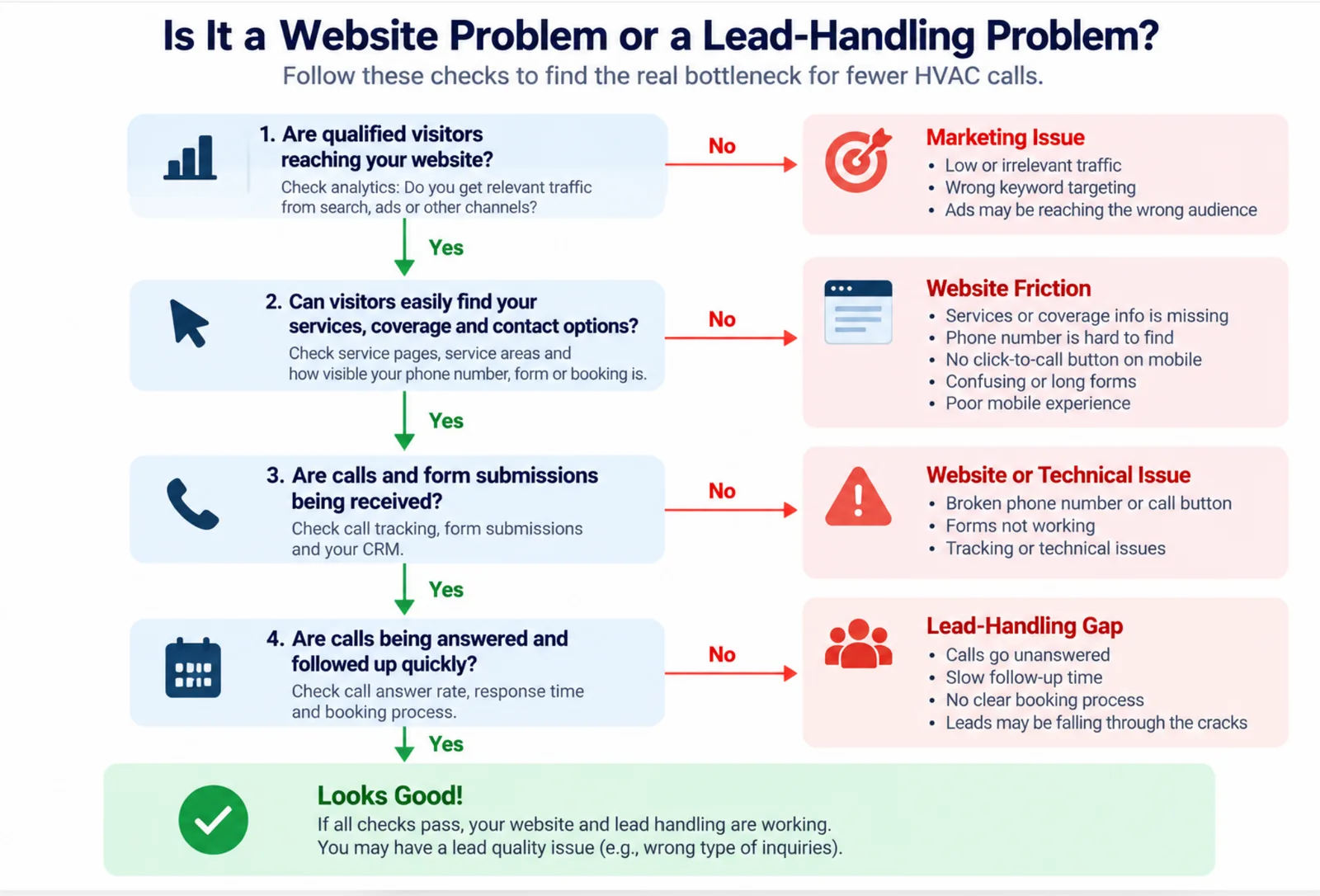
You can tell whether your website is the bottleneck by tracing a homeowner’s path from a local search to a booked job and identifying where it breaks. A low call count alone doesn’t prove the site is at fault. Few relevant visitors may point to a visibility or channel problem, while unanswered calls can waste leads from a website that works.
Start with your phone and search for emergency AC repair as a homeowner would. Emergency searches on mobile matter: estimates suggest more than half of searches happen on mobile, with some putting the share at 60-70%. Treat those figures as context, not a local benchmark. Check that the page loads, clearly explains what you repair and where you work, and makes a working click-to-call button easy to find. HVAC website contact information shouldn’t be buried in a menu.
Test the full contact path, not just the homepage. Tap the phone number, submit the HVAC contact form, and try any booking option. Each attempt should reach the right person and give the homeowner a clear confirmation. A broken form or confusing service choices can stop an inquiry. If a form submits but no one responds, the problem may be in your system or follow-up process.
Before paying for a redesign, check whether local search engines are bringing the right people to your site. Compare the services and areas on your pages with the work you want, such as heat pump service or emergency AC repair. Your Google Business Profile should have accurate hours, phone number, services, service area, photos, and regular updates. Local visibility depends in part on relevance, distance, and prominence, including reviews. Few relevant visits may signal a visibility or targeting issue rather than a website problem.
Follow every inquiry through to the booking outcome. Track calls, form submissions, appointments booked, and the marketing source for each lead. Then compare site visits with calls received, calls answered, and jobs booked. The pattern can help pinpoint the leak:
Few relevant visits: Check local HVAC SEO, your channel, and whether your service pages match the jobs you want.
Visits without contact attempts: Review mobile usability, page clarity, and how easy it is to call or book.
Contact attempts without answered calls: Check phone coverage and callback speed before changing the site.
Answered calls without bookings: Review appointment handling, follow-up, and whether the inquiry fits your services.
Lead quality needs a separate check. Your site may turn visitors into inquiries while attracting people outside your service area or looking for work you don’t take. Compare results by source instead of crediting every call to the website. A small number of qualified inquiries can also point to limited visibility, even when the contact path is clear.
Trace the chain from source to visit, call or form, answered inquiry, and booked job, then compare it with acquisition cost. Use the comparison to decide which part of the process needs attention first. Find the break before spending on a new site.
How Do You Track Visits Through To Booked Jobs?
A useful tracking system connects each marketing source to an inquiry, an answered conversation, an appointment, and a completed job. Website visits, call clicks, and form submissions are separate signals, not proof of booked work.
Record whether a homeowner found your business through Google search, your Google Business Profile (GBP), Google Ads, Yelp, or Facebook, then track the path from that source to a website visit, call or form inquiry, scheduled appointment, and completed job. Keeping these stages separate prevents more traffic from being mistaken for more revenue. Before any of that works, the site has to carry the tracking in the first place, and our HVAC website tech stack study found that 41% of contractor sites show no analytics or ad tags.
Use consistent source names so comparisons stay useful. Campaign tags on paid ads and social links can distinguish those visits, while analytics may separate organic search, paid clicks, and GBP traffic. If one Facebook campaign appears under several labels, your reports may make a single source look like several.
The stages to track are:
Visit: A person reaches your website from a tracked source.
Website action: Someone taps a phone number or submits an HVAC contact form.
Answered inquiry: Your team speaks with the caller or replies to the form request.
Booked appointment: The customer schedules a visit.
Completed job: The appointment results in work performed.
A tap-to-call click doesn’t show whether anyone reached your office, and a form submission doesn’t show whether anyone replied. Few contact actions may point to confusing pages or hard-to-find contact options. Missed calls and unanswered forms suggest a response or availability problem instead.
Review lead handling alongside website activity. Check whether calls were answered, voicemails returned, forms answered promptly, and appointments scheduled. Emergency customers may not wait for a callback, so a short service request, live chat for HVAC websites, a text widget for HVAC service, or online HVAC scheduling can give them another way to reach you. An HVAC booking widget can help customers request a time, but it won’t fix an unanswered phone line. Make after-hours expectations clear.
Review whether those details match the jobs you want to book. Simple navigation, clear homepage buttons, and distinct HVAC service pages help visitors find the right next step. List the cities and neighborhoods you serve, use location-specific titles such as “HVAC Repair in City Name,” and link relevant pages to your GBP. A service-area map can clarify coverage, and accurate GBP hours, service area, phone number, services, and photos keep business information consistent. Local HVAC SEO also depends on relevance, distance, and prominence, so each page should address a real local need rather than repeat a city name.
Compare source-tagged visits, calls, and forms with answered inquiries and appointment records over the same period. Strong traffic with few inquiries points to page clarity, navigation, or contact options. Plenty of inquiries but few bookings points to a response or scheduling gap. Reviewing sources separately helps you identify where the process is losing work. For how to choose and judge the channels that bring visitors in, read our guide to HVAC lead generation strategies. If the website is fine and you simply need more inquiries, our HVAC lead generation service delivers homeowner form submits to you alone.
What Should You Check Before Hiring A Website Provider?
Once tracking points to a website issue, confirm what a website provider’s work includes, how it supports booked jobs, and which business assets you’ll control before hiring one. Strong HVAC website design can reduce friction when the proposal addresses the barriers you identified.
A clear proposal defines the work before design begins. Check which pages, service-area details, contact and booking paths, and mobile issues the provider will address. The proposal should also state what’s excluded, who supplies copy and photos, what may affect the timeline, and what revisions and post-launch support include. If the provider projects more leads, ask which barriers the work is meant to remove and how you’ll judge the result.
The site should answer the questions homeowners need resolved before calling:
Services and availability: Make clear which services and areas you cover, and whether emergency, after-hours, weekend, or same-day service is available. Mention 24/7 emergency service only if your business can genuinely respond around the clock. Clear after-hours HVAC booking options help when your office isn’t staffed.
Contact and costs: Look for working “Call Now,” “Schedule Service,” and “Request an Estimate” actions. Booking options, diagnostic fees, pricing, and other charges should be easy to understand. Vague coverage or hidden fees can make homeowners hesitate.
HVAC trust signals: Genuine Google reviews for HVAC companies should be easy to find and tied to the services featured on the page. These may include NATE certifications or applicable EPA credentials. Real photos of technicians, your team, and branded vehicles help homeowners see who may arrive, unlike stock images.
Don’t judge a design from mockups alone. Open live HVAC sites on a phone and test their call buttons, forms, and booking steps. Ask what problem each example was built to solve and which results have been verified. Our comparison of the best HVAC website design companies shows what each one publishes about automation and named clients. Even polished HVAC homepage design can fail if the main call button is hard to tap or the form doesn’t explain what happens after submission.
Compare the full cost and service commitment, not just the build price. Request a plain-language breakdown of one-time fees, hosting or maintenance, optional work, payment milestones, revisions, and future changes. Find out where form requests go, who receives notifications, and how quickly leads are expected to be handled. Treat projected calls or revenue as estimates, not guarantees. Our guide to choosing an HVAC web design agency lists what a written scope should cover.
Your business should control the domain, website and hosting accounts, advertising accounts, call-tracking numbers, and Google Business Profile. Confirm that accounts are in your business’s name, what access you’ll have during the engagement, and what happens to the site, data, phone numbers, and profile if you leave. Profile hours, service areas, phone number, services, and photos should remain accurate and accessible.
Check whether the problem is the website or what happens after a lead arrives. Review the path from visits to calls, answered calls, and booked jobs, alongside acquisition cost, mobile usability, service-area clarity, contact paths, and lead fit. If calls go unanswered or callbacks are slow, a new site alone may not recover those jobs. When diagnosing the problem or implementing a fix exceeds your capacity, an advisory conversation can help clarify what to address before you commit to a build. If the audit points to the site, see how Honest HVAC Marketing Agency approaches HVAC web design.
HVAC Website Lost Service Calls FAQs
These FAQs cover how website friction, lead quality, and follow-up can affect HVAC service calls. They also help you distinguish a website problem from a gap in how incoming leads are handled.
1. Can Slow Mobile Pages Cost HVAC Calls?
Yes. Slow or awkward mobile pages can cost you HVAC calls if homeowners leave before finding your number or booking option. A mobile-friendly HVAC website needs readable text, content that fits the screen, and working buttons that are easy to tap. HVAC website speed and HVAC mobile website load time matter, but usability matters too.
The three-second warning is a commonly repeated caution, not a guaranteed cutoff for every visitor. Delays and other friction can raise abandonment risk, especially during emergency searches on mobile, when a homeowner needs emergency HVAC service.
2. Do Broken Click-to-Call Buttons Lose Service Calls?
Yes. A broken or non-clickable phone number can stop a ready-to-book homeowner from reaching you. A click-to-call HVAC website should keep a thumb-friendly “Call Now” button and clickable phone number in the mobile header on every page, with a direct booking option nearby. Test both paths on real iPhone and Android devices, including service pages, to confirm calls reach the right number and booking requests come through. Track completed calls and booked appointments by marketing source, not just button clicks, to see whether your site is producing service opportunities.
3. Can Outdated HVAC Pricing Drive Homeowners Away?
Yes. Outdated HVAC pricing, unclear fees, or vague booking options can make homeowners question your reliability before they call. In a 2025 HVAC customer survey, 21.0% cited higher-than-expected costs or surprise fees as a major frustration, despite overall satisfaction of 94.9%.
Keep prices, service-area coverage, fees, and booking expectations current and easy to find, with clear next steps such as “Call Now” or “Schedule Service.” A broken layout, cluttered text, spelling errors, or confusing navigation can also weaken trust, even when your pricing is clear.
4. Does Missing After-Hours Information Lose HVAC Leads?
Yes. Visitors may call another contractor if your site doesn’t clarify whether you offer emergency HVAC service calls, weekend, same-day, or after-hours HVAC booking. A 2025 survey found that 73.8% expected urgent HVAC service within 24 hours, including 29.8% within a few hours. Your emergency HVAC website should state your actual availability, not promise 24/7 coverage unless someone can respond around the clock.
If you can’t answer after hours, tell visitors when you’ll return calls and offer a working service form, online booking, or text widget for HVAC service. Since 50.3% preferred calling, explain whether they should call during business hours or expect a callback after submitting a request.